Building My Own Game for Board with the Web SDK
I got a Board. If you haven't seen one, it's a 23.8" touchscreen table you sit around with friends or family. You play by putting small physical pieces on the glass (robots, spaceships, a little chef with a knife), and the table can tell which piece is which, where it is, which way it's facing, and whether someone has a hand on it.
It comes with a bunch of games, but I didn't realize at first that you can make your own. Board has a developer portal at dev.board.fun with docs, SDKs, and the models that recognize the pieces. So I made one.
Picking an SDK
There are three SDKs, and they all support the same things: touch and piece input, players, saves, the system pause menu, and avatars.
| SDK | Good fit when |
|---|---|
| Unity | You already work in Unity, or you want the in-editor Simulator |
| Godot | You're on Godot 4.6+ with GDScript |
| Web | You want plain TypeScript / JavaScript and a static build |
I went with the Web SDK (@board.fun/web-sdk) since it's TypeScript and Vite, which I already use for web projects.
The game: Zone Rush
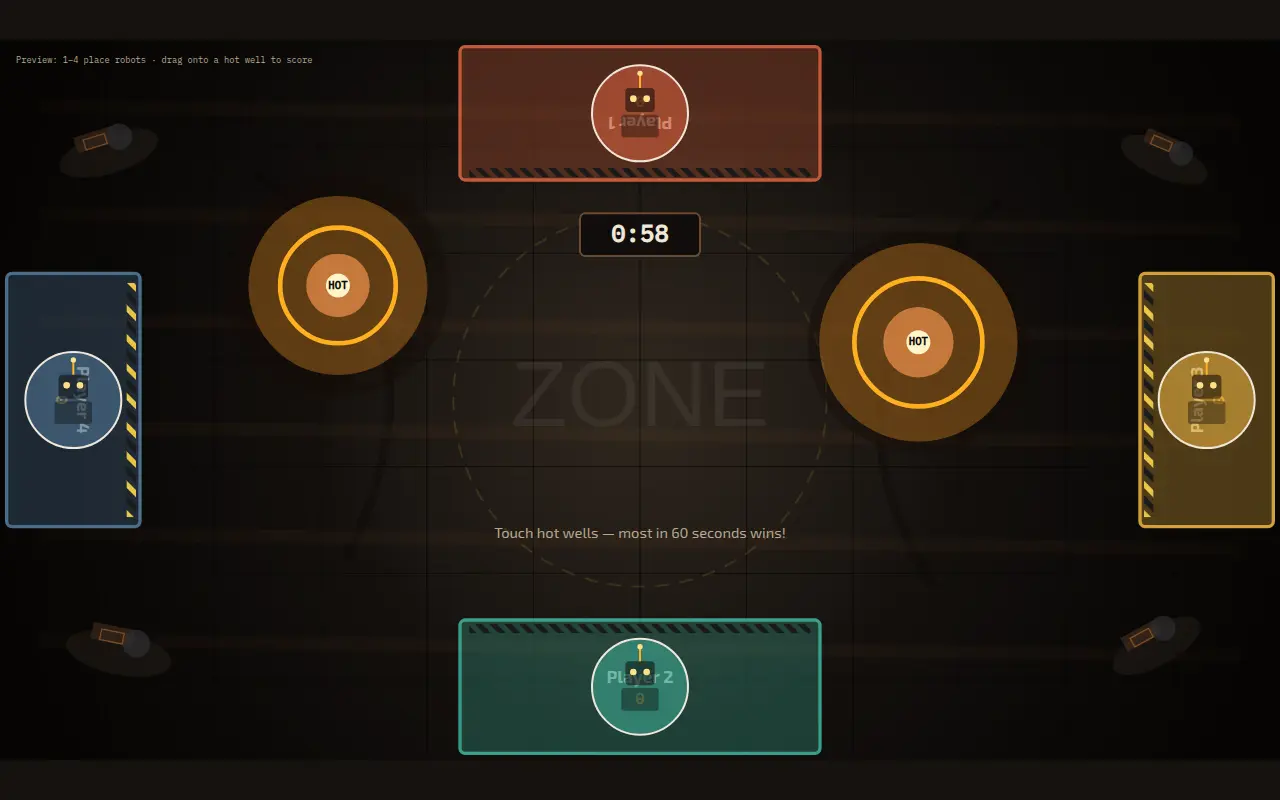
Zone Rush is a race for 2 to 4 players. Each player parks one of the Retro Arcade robots on their side of the table to claim a seat. Glowing "wells" then show up in the middle of the board, and you claim one by sliding your robot into it and letting go. After 60 seconds, whoever has claimed the most wells wins.
If you're playing alone, Solo Rapid mode respawns wells faster and you try to beat your own count.
I only designed around pieces I actually own. A Board comes with two piece sets, and I have Chop Chop, the Retro Arcade set (4 robots and 4 spaceships), and Board Sports. There are four robots, so robots were the obvious pick for a four-player game.
Things I had to handle differently on a table
No "down" or "up" events
Each frame, the SDK hands you a snapshot of everything touching the glass. It won't tell you that a piece was just placed or that a hand just let go, so you figure that out by comparing each frame to the last one:
for (const c of contacts) {
  seen.add(c.contactId);
  const prior = prev.get(c.contactId);

  if (!prior) {
    edges.placed.push(c);
  } else {
    if (c.x !== prior.x || c.y !== prior.y) edges.moved.push(c);
    if (c.isTouched && !prior.isTouched) edges.holdBegan.push(c);
    if (!c.isTouched && prior.isTouched) edges.holdEnded.push(c);
  }

  prev.set(c.contactId, { ...c });
}
Scoring hangs off that holdEnded edge. You get the point when your hand comes off the robot while it's sitting in a well.
Glyph id vs. contact id
The bottom of every piece has a glyph that the table reads. All four robots have the same glyph id, because the glyph tells you what type of piece it is and not which copy. To tell Player 1's robot from Player 3's, you use the contact id, which is different for each physical piece on the glass. If you store player state by glyph id instead, all four robots end up as one player.
The pause menu
Board OS takes care of the player list, the pause overlay, avatars, and saves. Your game tells it what it wants and responds to what comes back. For Zone Rush, that meant registering a pause menu with a Restart button:
Board.pause.setContext({
  gameName: "Zone Rush",
  offerSaveOption: false,
  customButtons: [
    { id: "restart", title: "Restart", icon: "circulararrow" },
  ],
});
Without this, the system menu button does nothing. The OS also shows the pause overlay without stopping your game loop, so you have to freeze it yourself. In my case that meant pushing the 60-second deadline back by however long the game sat paused.
Players on every side
People sit on all four sides of the table, so the seats are North, South, East, and West. Wells only spawn in a band across the middle so they don't land on anyone's seat, and text has to be readable from more than one direction.
Testing in the browser
I didn't want to walk over to the Board for every change, so I added a browser fallback for npm run dev. Keys 1 through 4 drop fake robots on the seats, you drag a robot to move it, holding Space counts as a hand on the piece, and letting go of Space scores. Backspace clears the board. That let me check most changes at my desk and save the real table for seeing how it played.
Installing it on the Board
The build gets packed together with the piece recognition model (a .tflite file) into a .webapp.zip, and you install that over your local network with board-connect:
npm run pack                                        # build + zone-rush.webapp.zip
board-connect pair <board-ip>                       # once; tap Approve on the Board
board-connect install zone-rush.webapp.zip --launch
On Web, if you forget to pack a model, the game gets no input at all, fingers included. Zone Rush ships with the Retro Arcade model (arcade_v1.3.7.tflite).
You also have to find out which glyph id your robots report the first time you run it on the table. Zone Rush shows a small Glyph Log in the corner, so you place one robot, read the number, and put it in src/pieces.ts. Until you set it, any piece counts as a robot, so the game still works on the first run.
Using AI
I set up the workspace for an AI assistant before writing the game. It has an AGENTS.md and a CLAUDE.md with the platform rules, Cursor rules for each SDK, and a PIECES.md listing the piece sets I own, so the AI only designs with pieces I can actually put on the table.
Board's docs include an "AI Assistant" page for each SDK with a rules file you can paste in. I split those up by engine so the Unity and Godot details stayed out of the way while I worked in TypeScript. Since rules like "track contact ids, not glyph ids" and "never quit with the engine API" were in those files from the start, the AI had them from the first prompt.
Making your own
The docs and SDKs are at dev.board.fun. Zone Rush uses one piece type and one mechanic, and the whole thing is a single Vite project.
Thanks for reading!
If you found this helpful, consider sharing it with others.
Building an Ad-Free Tic-Tac-Toe PWA with Cursor—With My Nephew in the Room
Tired of ads ruining simple games with my 5-year-old nephew, I built a tic-tac-toe PWA with Cursor while he watched—no code literacy needed, just seeing something get made. We tested on his iPad and kept adding features as we played.
Creators I Follow for Coding and Tech Updates
I added a new Creators page to highlight the YouTube channels I follow for coding ideas, web development, .NET, Vue, Nuxt, and tech news.