Building My Dream Desk Setup Starts With a Powerful Gaming PC
Disclosure: This post contains Amazon affiliate links. If you purchase through the links below, I may earn a small commission at no extra cost to you.
There's something deeply satisfying about a well-built desk setup. Not just the monitors lined up perfectly, the cable management hidden behind the desk, or the ambient lighting dialed in—but knowing that underneath all of it sits a machine you built yourself, piece by piece. For me, the desk setup obsession always comes back to the PC at the center of it.
That's why I made the trip down to Microcenter in Indianapolis.
Why Microcenter?
If you've never been to a Microcenter, it's hard to overstate the experience. It's not just a store—it's a pilgrimage for PC builders. The aisles are stacked floor to ceiling with CPUs, GPUs, cases, RAM, coolers, and every cable, screw, and adapter you could ever need. Prices are regularly below what you'd find online, and you can physically hold the parts before you buy.
The Indianapolis location on East Washington Street is worth every mile of the drive. Walking in with a build list and walking out with everything in hand—no shipping delays, no "out of stock" messages—is a completely different experience than ordering online. And the staff actually know what they're talking about.
The Build
Here's exactly what I picked up:
| Component | Part |
|---|---|
| CPU | AMD Ryzen 9 9950X3D 4.3 GHz 16-Core |
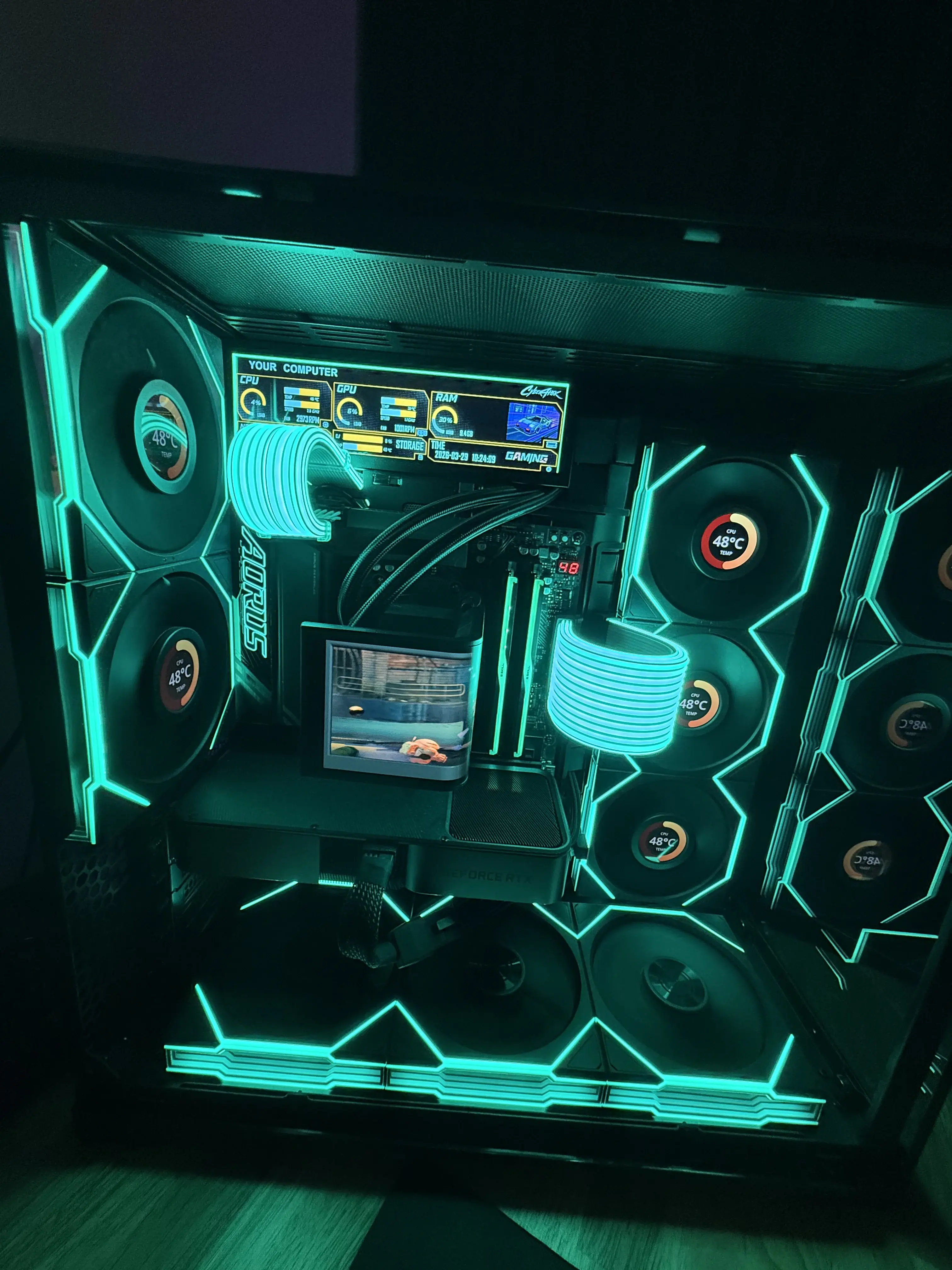
| CPU Cooler | TRYX PANORAMA SE ARGB Liquid Cooler |
| Motherboard | Gigabyte X870E AORUS PRO ATX AM5 |
| Memory | G.Skill Ripjaws M5 Neo RGB 32GB DDR5-6000 CL28 |
| Storage | Crucial T710 2TB PCIe 5.0 NVMe |
| GPU | NVIDIA Founders Edition GeForce RTX 3070 8GB |
| Case | Lian Li O11 VISION COMPACT ATX Mid Tower |
| Power Supply | Lian Li EDGE 1300W 80+ Platinum Fully Modular |
| Case Fans | Lian Li UNI FAN SL Wireless 120 (3-Pack) |
| Case Fans | Lian Li UNI FAN TL LCD Wireless 120 (3-Pack) |
AMD Ryzen 9 9950X3D — The Processor
The Ryzen 9 9950X3D is AMD's flagship desktop CPU: 16 cores, 32 threads, and a 4.3GHz base clock that boosts well beyond that under load. What sets it apart is the 3D V-Cache stacked on top of the die—a massive L3 cache that dramatically reduces memory latency, which is exactly what gaming workloads need. This chip doesn't have to choose between gaming performance and productivity. It dominates both. For a desk that doubles as a workstation and a gaming rig, there's nothing better in AMD's lineup right now.
TRYX PANORAMA SE ARGB Liquid CPU Cooler — The Cooler
The TRYX PANORAMA SE is a serious AIO with serious looks. The panoramic ARGB display on the pump head is one of the most striking visuals in the Lian Li O11 VISION case—it turns the cooler into part of the aesthetic, not just a functional component. Performance-wise, it's built to handle the thermal demands of a 16-core chip under sustained load. Quiet fans, solid build quality, and RGB that actually looks intentional rather than thrown on.
Gigabyte X870E AORUS PRO ATX AM5 — The Motherboard
The X870E AORUS PRO is a premium AM5 board with everything the 9950X3D needs: robust VRMs for stable power delivery under full-core loads, PCIe 5.0 for both the GPU and the NVMe slot, DDR5 support, and WiFi 7 built in. Gigabyte's AORUS lineup has a reputation for overbuilding the VRM section, which pays off when you're pushing a 16-core processor and don't want throttling to enter the conversation.
G.Skill Ripjaws M5 Neo RGB 32GB DDR5-6000 CL28 — The Memory
32GB of DDR5-6000 is the sweet spot for AM5 and the 9950X3D's memory controller. The Ripjaws M5 Neo RGB kit runs at CL28 with AMD EXPO support, meaning the board auto-configures the timings correctly out of the box—no manual tuning required. The RGB is subtle and pairs well with the rest of the Lian Li ecosystem. 32GB covers gaming, dev work, and multitasking without any compromises.
Crucial T710 2TB PCIe 5.0 NVMe — The Storage
The Crucial T710 is a Gen 5 NVMe drive, which means it operates at a completely different tier than the Gen 4 drives most people are still using. Sequential reads push well past 12,000 MB/s. Game load times effectively become non-existent, large file transfers are nearly instant, and the Gigabyte X870E board has a Gen 5 slot ready to take full advantage of it. 2TB gives enough room for a large game library and a dev environment without having to manage space carefully.
Lian Li O11 VISION COMPACT ATX Mid Tower — The Case
The O11 VISION COMPACT is a purpose-built showcase case. Three tempered glass panels expose every component—the CPU cooler, the fans, the motherboard, all of it. Lian Li designed this case to be looked at. The compact footprint keeps the desk from feeling dominated by the tower, while still fitting full ATX boards and 360mm radiators. Combined with Lian Li fans, everything inside the case exists in one unified ecosystem: consistent lighting, consistent aesthetics, clean result.
Lian Li EDGE 1300W 80+ Platinum — The Power Supply
A 1300W fully modular PSU gives massive headroom for current components and any GPU upgrade down the road. The EDGE is 80+ Platinum certified, meaning it runs efficiently and wastes less power as heat. Being fully modular means only the cables you actually need are in the case—critical for keeping the interior of the O11 VISION clean and presentable. No excess cable clutter killing the look of the build.
Lian Li UNI FAN SL Wireless 120 — Case Fans (Reverse Blade, 3-Pack)
The UNI FAN SL Wireless series connects daisy-chain style with a single cable per stack—no individual fan headers, no wire mess. The reverse blade design pulls air in a way that's optimized for the O11's airflow layout. Wireless ARGB sync means the lighting stays consistent without extra controller cables threading through the build.
Lian Li UNI FAN TL LCD Wireless 120 — Case Fans (LCD Display, 3-Pack)
The UNI FAN TL LCD fans take it a step further: each fan has a small LCD screen on the hub that can display temperatures, RPM, custom images, or animations. In a showcase case like the O11 VISION, these aren't just fans—they're part of the display. They run on the same daisy-chain system as the SL fans, keeping the wiring clean while adding a layer of customization that's hard to find anywhere else.
NVIDIA Founders Edition GeForce RTX 3070 8GB — The GPU (Carried Over)
Not every part in a new build has to be new. The GPU market right now is rough—prices are inflated across the board, driven by AI demand and ongoing chip shortages that have pushed even mid-range cards well above what they should cost. Buying a current-gen GPU at these prices just doesn't make sense when you already have solid hardware that still performs.
The RTX 3070 Founders Edition is still a capable card. It handles 1440p gaming without issue, supports ray tracing and DLSS, and pairs fine with everything else in this build. The Founders Edition design is clean and minimal, which fits the O11 VISION aesthetic better than most third-party cards anyway. When GPU prices come back down to earth, an upgrade is easy—the platform and PSU headroom are already there. Until then, the 3070 earns its place in the build.
The Desk Setup Connection
The PC is the centerpiece, but the desk setup is the full picture. With this build done, the rest of the setup follows from it:
- Monitors — The hardware inside deserves a display that can actually keep up
- Peripherals — A mechanical keyboard, precision mouse, and audio that match the level of the build
- Cable management — Clean routing so the build stays the visual focus
- Lighting — The Lian Li fans already handle most of the ambient glow; everything else just needs to complement it
Every piece of a desk setup is a deliberate choice. When the hardware is right, everything else slots into place naturally.
Final Thoughts
There's no substitute for building it yourself. You understand why every part exists, you make choices that fit your specific workflow, and you end up with something that genuinely feels like yours. The full Lian Li ecosystem—case, PSU, and fans all from the same brand—was a deliberate call: everything matches, everything integrates cleanly, and the result looks like it was designed as a single product rather than a pile of separate parts.
The trip to Microcenter in Indy made it real. Being able to see every part in person before committing, get the right advice in the aisle, and walk out same-day with everything boxed up is an experience online shopping can't replicate.
If you're thinking about building a desk setup from scratch, start with the PC. Everything else is just furniture.
Find the Parts
Want to build something similar? I put together a full list of the parts used in this build on Amazon. If you pick anything up through the link, it helps support the work I put into posts like this—no extra cost to you.
Thanks for reading!
If you found this helpful, consider sharing it with others.